










|
|
|
|
|
|
|
|
|
|
|
|
|
|
|

THAYER'S QUEST KEYBOARD EMULATOR
Developed by Warren Ondras - 3 May 2001
INTRODUCTION
JOURNEY TO A LAND OF MAGIC AND WONDER!
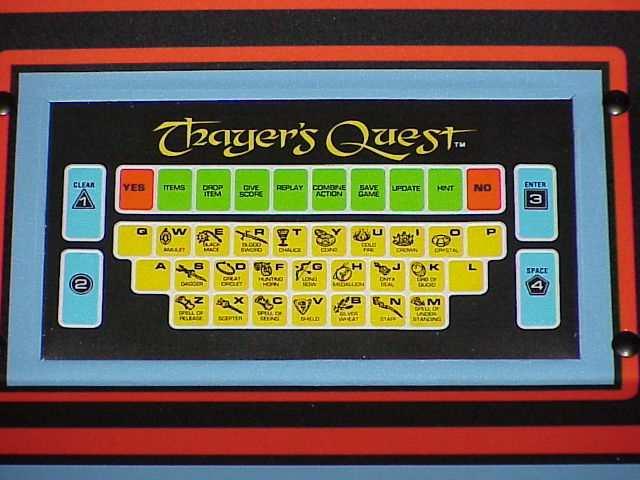
Thayer's Quest is a 1984 laserdisc arcade game which had the novel concept of using a keyboard for the player to interact with the game. (The keyboard used was a custom-designed flat membrane style.) Unfortunately, these keyboards did not hold up particularly well against the rigors of arcade life, and so now, decades later, they have become extremely difficult to find. (The rest of the components of the game are not exactly common either, but the keyboard is definitely the hardest to come by.) As I have so far been unable to locate an original keyboard, creating a substitute seemed my best bet for playing the game. Hopefully others will find it useful as well.
Special thanks to Mark Broadhead for divining the inner workings of the TQ keyboard interface.
DOWNLOAD
Full documentation is also included in the the download.
DOWNLOAD TQKEY10.ZIP NOW!
THEORY OF OPERATION
This program allows you to emulate the original keyboard for Thayer's Quest by using a PC connected to the
Thayer's Quest board via the PC's parallel (printer) port.
(It does NOT emulate the entire game, just the keyboard hardware.)
SYSTEM REQUIREMENTS
CONSTRUCTION
Interface Cable: In order to connect your PC to the TQ hardware, you need to create a custom
interface cable. The TQ board has a small four-pin connector for the keyboard, with pins labeled
R, Y, G, and B. You will need to obtain a cable/plug that fits it. Ideal candidates are 3.5"
floppy power connectors, or CD-ROM audio cables, as both are readily available. (I have not yet tried
to find a source for ordering a specific connector.) You will also need a standard DB25M (25-pin Male)
connector to connect to the PC's parallel port.
NOTE: It is possible to damage your parallel port, your computer, and/or your TQ boardset if
incorrect connections are made.
If you are still with us, connect the two together as follows:
| TQ PIN | PARALLEL PORT PIN |
| R (+5V) | NOT Connected |
| Y (clock) | 10 (_ACK) |
| G (data) | 1 (_STROBE) |
| B (ground) | 25 (GND) |
OPERATION
Simply run TQKEY.EXE from a DOS prompt. (There are no parameters/arguments at this time.)
If the interface cable or TQ boardset is not functioning, you will see periodic error messages.
Otherwise, key presses are passed to TQ via the parallel port. Pressing ESC terminates
the program.
Valid keys are:
| A | N - Staff | 0 - "No" |
| B - Silver Wheat | O - Crystal | 1 - "Yes" |
| C - Spell Of Seeing | P | 2 - Items |
| D - Great Circlet | Q | 3 - Drop Item |
| E - Black Mace | R - Blood Sword | 4 - Give Score |
| F - Hunting Horn | S - Dagger | 5 - Replay |
| G - Long Bow | T - Chalice | 6 - Combine Action |
| H - Medallion | U - Cold Fire | 7 - Save Game |
| I - Crown | V - Shield | 8 - Update |
| J - Onyx Seal | W - Amulet | 9 - Hint |
| K - Orb of Quoid | X - Scepter | F1 - Option #1 / Clear |
| L | Y - Coins | F2 - Option #2 |
| M - Spell Of Understanding | Z - Spell Of Release | F3 - Option #3 / Enter |
| F4 - Option #4 / Space |
|
LICENSE / SOURCE CODE
The TQKey application can be freely distributed, provided it is unmodified and is not sold for profit.
The source was written in Borland C++ 5.0, but it should compile in nearly any version of Borland C++ that can
create DOS apps, and it is probably easily portable to other compilers if necessary. You are free to
use/modify it for your own projects, provided that A) a credit is given to the original author, and B) you do
not do so for profit. (If you can find a way to make money from this, give us a cut and we'll talk about it!)
OTHER INFORMATION
We are currently considering porting this program to a dedicated hardware card that would eliminate the need
for the PC. If you have any interest in seeing such a device, or would like to help, please let us know!
Also, it would be great if someone could make custom keycaps, or a flat membrane keyboard with the original TQ key layout.
Such a keyboard would also be useful with the Daphne
Emulator. If anyone comes up with anything for this, let us know!
Good luck!
DISCLAIMER
The information contained in this document is believed to be correct and works fine for the author. We are not responsible if you cause damage to your Thayer's Quest boardset, your computer, or yourself.
HOME |
LASER GAMES | LASER COMMUNITY | TECH CENTER